Cross stitch pattern tracker for the PDFs you bought
Open a PDF pattern and mark stitches as you go, right in your browser — on an iPhone or iPad too, where Pattern Keeper does not run. Nothing to install, and the PDF stays on your device.
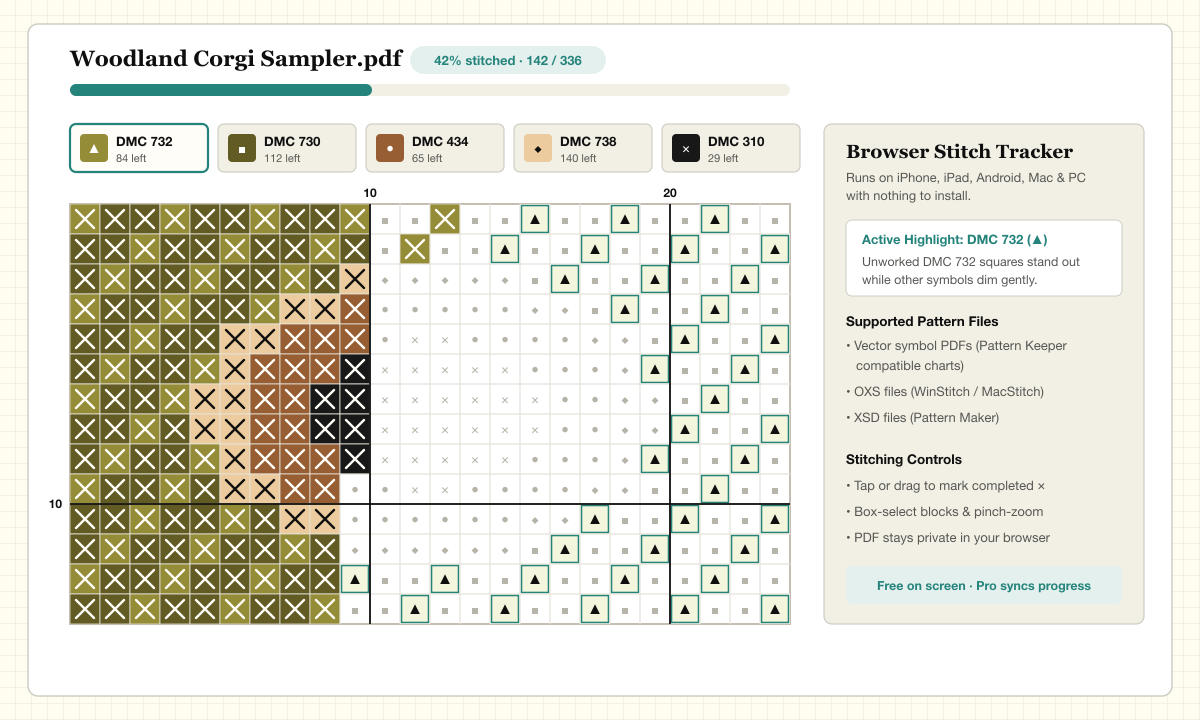
How it works
- Choose the PDF. Your browser reads the chart pages, the row and column numbers printed along their edges, and the floss key. A color copy of the chart is counted once.
- Check it. See the whole chart, where each page went, and every symbol as printed with its DMC number. Fix a page's position or a missing number before you start.
- Stitch. Tap a stitch to mark it, drag for a run, or drag a box over a block you finished. Pick a color to show it alone. Free, it stays on screen while the page is open; with Pro your progress is kept.
Open an XSD or OXS pattern file
Got a pattern as a file rather than a PDF? Choose it above: an XSD file from Pattern Maker for Cross Stitch, or an OXS file, the open format that WinStitch, MacStitch, Cross Stitch Professional and other programs save. Every stitch and color comes from the file, so there is nothing to check: start stitching straight away, on screen free, with your progress kept on Pro. To change it or print it as a PDF, open the same file in the pattern maker; it prints like your own pattern, first PDF free. A pattern from a file is someone's design, so it cannot be shared publicly or put in a seller kit.
What the tracker does
- Marks keep their symbol, so the chart still reads after you mark it. Free.
- The share done for the whole pattern. Free.
- Box marks every stitch in a rectangle at once. Free 3 times a day, unlimited with Pro.
- Your progress kept when you leave the page, on every device. Pro.
- A new mark color every day you stitch; earlier marks keep theirs, so you can see what you did when. Pro.
- Park pins a parked thread to its stitch, in the thread's color. Pro.
- Mistake marks stitches to unpick in red until you fix them. Pro.
- Stitches left for every color. Pro.
- Timer and calendar: stitches and time per day, stitches per hour, and how many more stitching days at your usual pace. Pro.
Making your own pattern instead? The cross stitch pattern maker turns a photo into a chart, and every pattern you make there opens in this tracker too, one at a time free with its progress kept.
Used to the Pattern Keeper app on Android? It does not run on iPhone, iPad or PC; this tracker does. Devices, price, which PDFs each reads and how progress moves between devices are set out row by row in how this tracker compares with Pattern Keeper. If a PDF key names a discontinued DMC shade or a number missing from your stash, look up the nearest substitute on our DMC color and substitute chart.
Questions
Which PDF patterns can it read?
PDFs whose chart symbols are text in the file, which is how most pattern software exports and what “Pattern Keeper compatible” on a listing means. Scanned patterns, and PDFs that draw each symbol as a picture, cannot be read yet: the page says so instead of guessing.
Is my PDF uploaded?
No. The PDF is read by your own browser and never sent to us. With Pro, the chart it found and your progress are kept: in this browser and in your account, so your other devices can open it. Without Pro nothing is kept: the chart is on screen until you leave the page.
Can it open an XSD, OXS or PCStitch .pat file?
XSD files from Pattern Maker for Cross Stitch and OXS files (the open format WinStitch, MacStitch, Cross Stitch Professional and others save) open here and in the pattern maker, with their full, half, quarter and three-quarter stitches, backstitch, French knots, beads, Pattern Maker straight stitches (as long stitches) and OXS lazy daisies; other specialty stitches are left out and the page says how many. Floss numbers that are not DMC, Anchor or Cosmo are matched to the closest DMC color and listed. PCStitch .pat files cannot be opened: the format is private and changes between versions; open the PDF of the pattern instead.
Does it work on an iPhone or iPad?
Yes. It runs in Safari, Chrome or any modern browser on iPhone, iPad, Android, Windows, Mac and Chromebook, with nothing to install. Pinch to zoom and tap to mark; where the browser allows it, the screen stays on while you stitch.
What if a symbol has no DMC number?
Before you start, every symbol is shown as printed in your PDF next to the DMC number read from its key. Type a number for any symbol that has none, or change one; a symbol without a color is still tracked, in grey.
Are half stitches and backstitch read?
Not yet. Full cross stitches are read; smaller half and quarter stitch symbols, backstitch lines and French knots in the PDF are left out, and the page tells you when it saw some.
Is it free?
Reading the PDF and marking it on screen are free: tap or drag to mark, show one color alone, see your percent, and Box-mark a block 3 times a day. Pro keeps your progress when you leave the page, for every PDF and on every device, and adds parked threads, stitches to unpick, stitches left per color, day colors, a timer and a calendar, progress photos, folders and a 30-day trash, and the tracker opening without internet. From $3.99 a month or $24 a year, renews until you cancel; regular price $59 once for lifetime.
Does it work offline?
With Pro, yes. Open the tracker and My patterns once with internet on: this device keeps a copy of both pages, and your patterns and progress are already stored in the browser. After that they open and mark stitches with no connection (on an iPhone or iPad, add the page to your home screen). Progress made offline syncs to your other devices next time you are online. Opening a new PDF needs this page, online.
Can I keep progress photos of my stitching?
With Pro, choose Photos in the tracker and add a picture of your work. Each photo keeps the date and how far along you were, in order, so you can see the piece grow. Photos are shrunk to 1600 pixels and kept on this device only, in this browser; they are not uploaded or synced.
What is parking, and how do I mark parked threads?
With the parking method you do not end a thread when its color stops: you bring the needle up where that color starts again further on and leave it there. Choose Park (Pro) and tap that stitch: a pin in the thread color stays on the chart until you tap it again.
Updated 2026-11-18. Compare cross stitch tools