Photo to cross stitch pattern
Choose a photo and get a stitchable chart with DMC floss numbers, symbols and skein counts in a few seconds. The conversion runs in your browser — the photo is not uploaded to make the pattern. First PDF free.
Choosing the photo
The converter copies what is in the photo, so the photo decides most of the result.
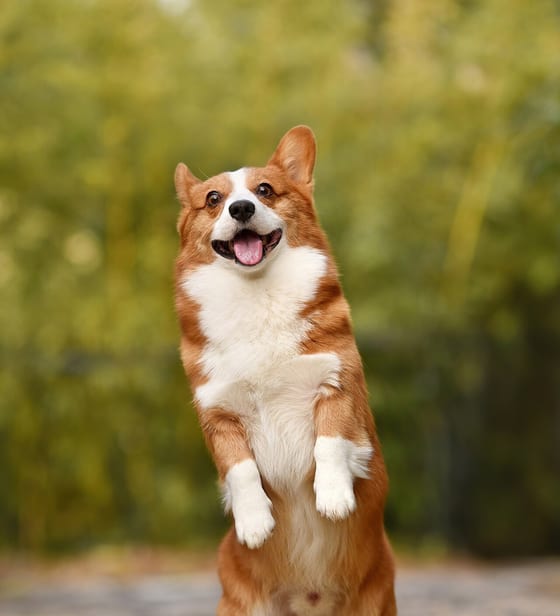
- One subject, close up. Crop so the face, pet or house fills most of the frame before you upload.
- Even light. Daylight from the side or front. Hard shadows become patches of dark brown and black.
- Plain background. A wall, sky or lawn out of focus. On Pro you can leave a plain background unstitched.
- Sharp, not tiny. At least 600 pixels wide. Phone photos are fine.
Width, colors and clean-up
Start at 100 stitches and up to 30 colors, then look at the check above the preview. If it says Moderate or Hard, lower the colors first, then crop closer. Basic clean-up is on by default and merges lonely single stitches into their neighbours. The full walk-through, with our test numbers, is in how to turn a photo into a cross stitch pattern.
What you get
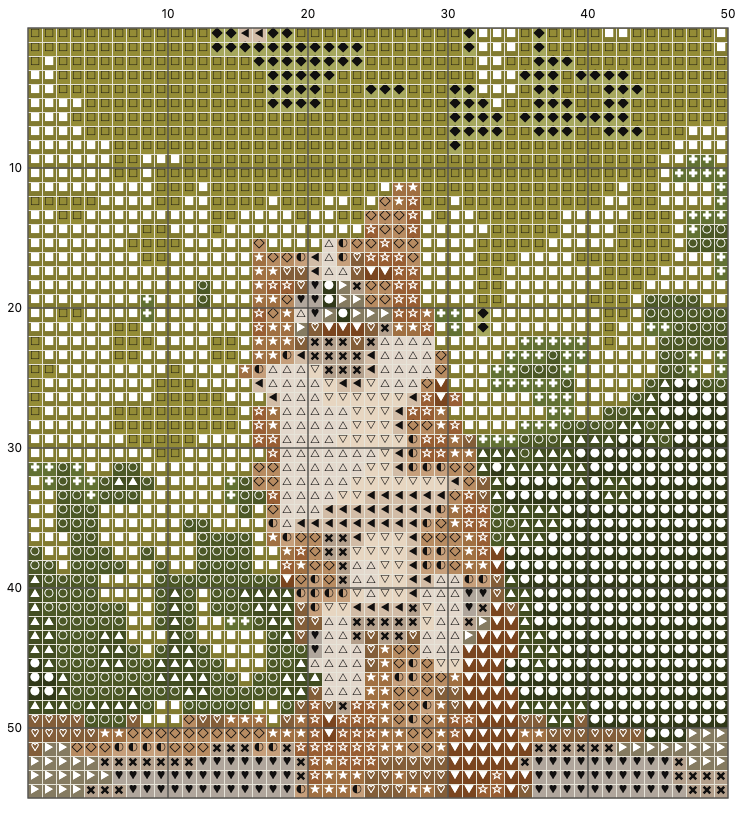
A PDF with a cover, a black-and-white symbol chart split over A4 or US Letter pages (2 rows repeat between pages so they line up, bold lines every 10 stitches), a colour chart and a floss key with DMC numbers, names, stitch counts and skeins. Want the size on another fabric? Use the cross stitch fabric and floss calculator. Comparing converters? See how we differ from Pic2Pat. Your first PDF is free; the Pro passes cover more.
How the conversion works
Everything happens in your browser; the photo is not sent anywhere to convert it. The photo is shrunk to one pixel per stitch at the width you pick. The colours are then reduced to the number you allow, and each one is matched to the nearest of 454 DMC floss colours by how different the two look to the eye (the CIEDE2000 colour difference), not by raw numbers. Each stitch gets the closest of those floss colours, without dithering, the speckle some converters add to fake in-between shades. Last, clean-up looks for lonely single stitches with no neighbour of the same colour and gives them the colour most of their neighbours have.
The check above the preview counts those lonely stitches, called confetti. Under 5% is easy to stitch; 5–12% is doable but slow; above that, expect a thread change every few stitches. Two photos at the same settings can give very different numbers, which is why the check comes before the download.
What it cannot do
Only full cross stitches: no half stitches, quarter stitches or backstitch outlines, and no editor to change single stitches by hand. Colours on screen are approximate, so check your floss against a real DMC colour card. There is no phone app; the site works in the browser on a phone.
Questions
Which photos make the best cross stitch patterns?
Sharp photos with one clear subject, even light and a plain background: a pet looking at the camera, a house front, a couple against the sky. Busy backgrounds, motion blur and dark shadows turn into confetti.
How many stitches wide should a photo pattern be?
Faces and pets: 100–150. Houses and buildings: 70–120. Small gifts and cards: 40–70. Wider means more detail and a bigger, longer project.
Can I use an image I found online?
Only if you have the right to: your own photos, photos you were given permission for, or images with a licence that allows it. Selling a pattern made from someone else’s photo needs their permission.
Is the photo to pattern converter free?
Yes: conversion, preview, floss list and PNG are free every time, and the first PDF is free. More PDFs need Pro, from $3.99 for 30 days.
Updated 2026-11-15. Back to the pattern maker